


Connects straight to your 2.4 GHz Wi-Fi — no hub required
 Selling fastlimited stock at this price, order today
 Local Automation

 Works Offline
Multi-Device Automations
Limited
Remote Access Included
*
Usually a monthly plan
10 Years of Remote Access Included*
Your first EzloPi hardware purchase includes 10 years of Ezlo Cloud remote access for every EzloPi device included in that purchase — whether you buy a single device, a two-pack, or a larger multipack.
Remote access for additional EzloPi devices starts at $2.50 per month. Local control remains free on every device

Turn your lights on or off from anywhere. No hub required
Works with Alexa, Google Home and Home Assistant
 In Stock
 Smart Switch
 Smart Dimmer
Pick 2 or 3 in total
Product highlights
-
 Effortless Device Control
-
App-enabled voice control
-
Connectivity with other smart devices via Home Assistant and Ezlo
-
Seamless Automation with MeshBots via MiOS app


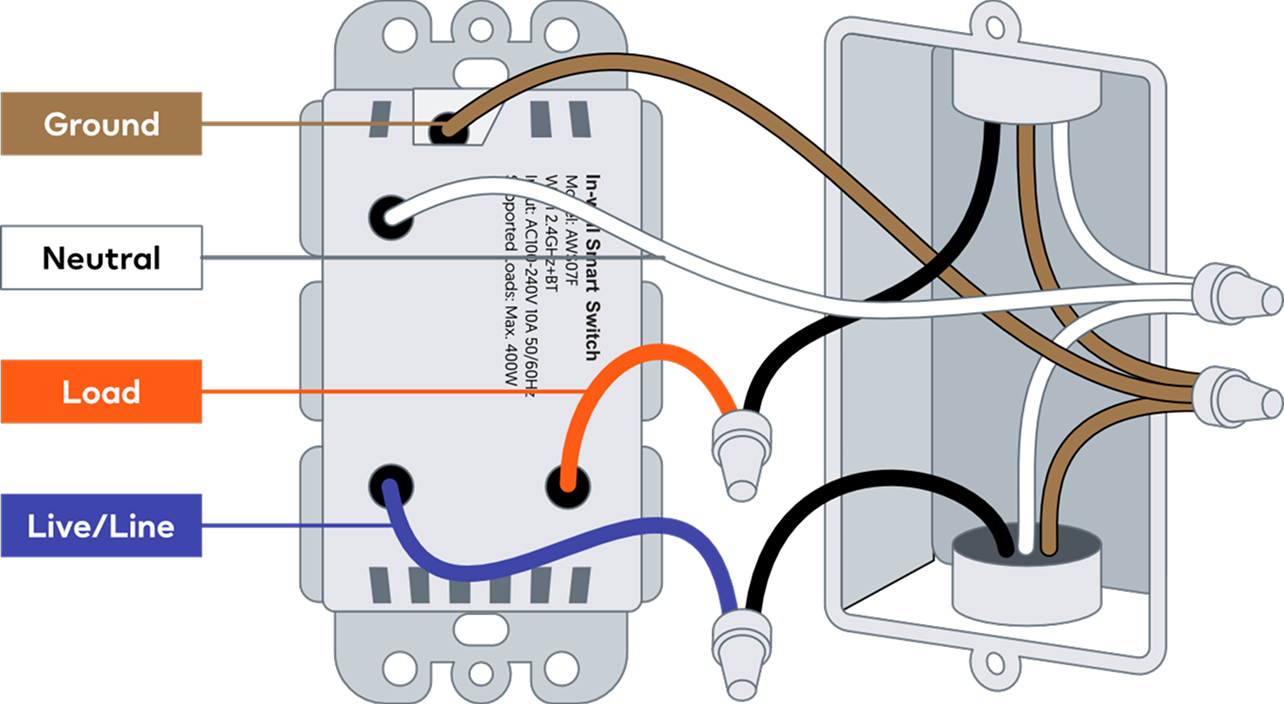

High Voltage Device: Risk of Electric Shock — this device operates on AC 100-240V electricity. Installation requires direct interaction with your home's electrical wiring.
Turn Off Power: Always switch off the main power at your circuit breaker before attempting installation.
Professional Recommended: If you're not experienced with electrical wiring, we recommend hiring a licensed electrician to ensure a safe and code-compliant installation. If you are unfamiliar with electrical diagrams, line/load identification, or safety protocols, do not attempt to install this device yourself.
Looking for the full installation manual? A detailed step-by-step setup guide for the Frankever Smart Switch is available on Ezlo Support.
Upgrade to the Frankever Smart Switch for Local Control at the Wall or in the App
Control Your Lights at the Wall or in the App — even When the Internet Is Down. The Frankever Smart Switch puts EzloPi intelligence inside the switch for fast, private control that stays in your home
Instant response
Commands run on the switch itself, so your lights respond the moment you tap, swipe, or press
Private by default
Everyday control through the Ezlo app or Home Assistant stays on your home network. Only remote access uses Ezlo’s secure US-based cloud
Works through internet outages
If the internet is unavailable, the wall controls and the app on your home Wi-Fi keep working

Smart Control with a Built-In Nightlight
A built-in RGB nightlight behind the paddle adds a soft glow, making the switch easy to find in the dark. Turn the connected light on or off at the wall, through the MiOS app or Home Assistant, or with a compatible voice assistant. With Ezlo Cloud remote access, you can also control it when you’re away from home


A soft glow for late nights
A soft glow behind the paddle guides you to the switch at night. Double-click to turn it on, double-click again to turn it off. No app, no extra lamp

True Local Operation
Maximum speed and privacy with zero cloud dependency

US-Based Cloud Operation
Secure remote access hosted entirely on compliant US-based servers when using MiOS. No overseas hops and no third-party relay between you and your home

Remote Control
Control your lights from anywhere, not just from your living room


Automated Schedules
Custom timers and routines that execute locally, even without internet

Home Assistant Ready
Native integration available via HACS. Enjoy seamless BLE onboarding from your phone to configure your devices with absolutely no coding required

Built-In RGB Night Light
Customizable colors and brightness for functional and aesthetic ambiance

Effortless Home Assistant
Take full advantage of the native EzloPi Home Assistant Integration, available directly via HACS. We've made local control easier than ever:

Zero Coding Required
Build your perfect smart home ecosystem and configure devices without any programming knowledge
Local Control
All device control is handled locally, ensuring fast response times and privacy
BLE Onboarding
Easily onboard and configure devices using your iPhone or Android device
Frankever Smart Switch


Frankever on the wall. EzloPi inside
The Open-Source, US-Secure Foundation for Your Smart Home
Choose ultimate control and peace of mind with EzloPi. Our Wi-Fi devices offer secure, local operation, a US-based cloud, and are built to be Home Assistant Ready, ensuring a future-proof, private, and reliable smart home experience
Before you buy
Will this switch work in my home?
Four quick questions about the switch you're replacing. They cover the reasons a smart switch doesn't fit.
Works with
What works, and where
"Works with" means different things in different apps. Here's what you can do in each one and what it needs.
| App | Support | What you can do | Runs locally? | What you need |
|---|---|---|---|---|
| MiOS app | ✓ Full | On/off, schedules, MeshBot automations, nightlight and Night Mode, remote control | Yes, on your home Wi-Fi. Away from home through Ezlo Cloud | iPhone or Android phone |
| Home Assistant | ✓ Native | On/off and Home Assistant automations | Yes, fully local | EzloPi integration from HACS. Set up over Bluetooth from your phone |
| Amazon Alexa | ✓ | Voice on/off | No, through Ezlo Cloud | Your Ezlo account linked in the Alexa app |
| Google Home | ✓ | Voice on/off | No, through Ezlo Cloud | Your Ezlo account linked in the Google Home app |
| Apple Home / Siri | ✕ No | Use the MiOS app, or add the switch to Apple Home through Home Assistant's HomeKit Bridge | ||
| Matter | ✕ No | Not supported | ||
| Ezlo Plus hub | Optional | Adds Z-Wave and Zigbee devices, including other brands, to the same MiOS app | Yes | Not needed for this switch |
When things go wrong
What still works without internet, Wi-Fi or power
The switch runs its own logic (EzloPi inside), so everyday control doesn't depend on the cloud.
| If this happens | Wall switch | App at home | Schedules | Away from home and voice |
|---|---|---|---|---|
| Internet is down | ✓ Works | ✓ Works | ✓ Keep running | Paused until the internet is back |
| Ezlo Cloud unavailable | ✓ Works | ✓ Works | ✓ Keep running | Paused. Home Assistant keeps working |
| Wi-Fi router is off | ✓ Works | ✕ The app can't reach the switch | ✓ Keep running | ✕ |
| Power cut | When the power comes back, the switch starts with the light off and rejoins your Wi-Fi on its own. | |||
Which one do you need?
Smart Switch or Smart Dimmer?
Both work in the same MiOS app, need the same wiring, and can be mixed and matched in the bundle above.
| Smart SwitchYou're here | Smart Dimmer | |
|---|---|---|
| Model | FK‑SW101‑US | FK‑SW102‑US |
| Best for | Porch, hallway, closet, garage | Living room, bedroom, dining room |
| Brightness | On/off only | Dims from 0 to 100% at the wall or in the app |
| Max load | 800 W per gang | 400 W incandescent, 150 W dimmable LED, 150 W CFL |
| Neutral wire | Required | Required |
| Price | $9.95 | $9.95 |
| View the Smart Dimmer → |
Specifications
The full technical sheet
| Model | FK-SW101-US |
|---|---|
| Switch type | Single-pole, on/off only. Does not dim |
| Wiring | Line, load, neutral and ground required. No-neutral installation is not supported |
| Power supply | AC 100–240 V, 50/60 Hz |
| Max power load | 800 W per gang |
| Connectivity | Wi-Fi 2.4 GHz (802.11 b/g/n). Set up over Bluetooth from your phone |
| Hub | Not required |
| Nightlight | Built-in RGB + white, 2 W. Double-click the switch to turn it on or off |
| Dimensions | 3.39 × 3.39 × 1.73 in (86 × 86 × 44 mm) |
| Operating temperature | 14°F – 122°F (−10°C – 50°C) |
| Apps | MiOS (iOS and Android), Home Assistant (EzloPi integration via HACS) |
| Voice | Amazon Alexa, Google Home |
| Remote access | Ezlo Cloud, hosted in the US |
| After a power cut | Starts with the light off and reconnects to Wi-Fi automatically |
| Firmware updates | Over the air through the MiOS app |
Wiring diagram, safety warning and the installation manual are in the technical specifications at the top of this page.
Frequently Asked Questions
One app for your whole home
The MiOS app runs this switch alongside the rest of your home: Frankever switches and dimmers, EzloPi Wi-Fi devices, and Ezlo hubs that bring in Z-Wave and Zigbee devices from many brands. Schedules, automations and remote control for all of them, in one place


Add another when you need it


Over a Decade of Smart Innovation
With over 10 years of experience, Ezlo has developed a platform trusted by dealers, builders, utilities, and real estate companies across the globe. Our technology processes 1.2+ billion smart events each month, powering over 1 million connected devices—all designed to work seamlessly together

Trusted Around the World
Ezlo's solutions are used in 60+ countries and trusted by some of the biggest global brands. Our international team works every day to deliver reliable, scalable technology that transforms how people interact with their spaces

What's New at Ezlo
Update info to Ezlo property and Ezlo Sens